Webhook Setup
Configure webhooks to receive real-time notifications about document events.
Overview
Webhooks are HTTP callbacks triggered by specific events in Documenso. When an event occurs (such as a document being signed), Documenso sends an HTTP POST request to your configured URL with details about the event.
Common use cases include:
- Syncing document status with your database
- Triggering automated workflows when documents are signed
- Integrating with CRM systems or other third-party services
- Sending custom notifications to stakeholders
Webhooks are available for teams only. Personal accounts cannot configure webhooks.
Creating a Webhook Endpoint
Before configuring a webhook in Documenso, you need an endpoint that can receive HTTP POST requests. Here's a minimal example:
const express = require('express');
const app = express();

app.use(express.json());

app.post('/webhooks/documenso', (req, res) => {
  const { event, payload, createdAt } = req.body;

  console.log(`Received event: ${event}`);
  console.log(`Document ID: ${payload.id}`);
  console.log(`Document title: ${payload.title}`);

  // Process the webhook event
  switch (event) {
    case 'DOCUMENT_COMPLETED':
      // Handle completed document
      break;
    case 'DOCUMENT_SIGNED':
      // Handle signed document
      break;
    // Handle other events...
  }

  // Respond with 200 OK to acknowledge receipt
  res.status(200).json({ received: true });
});

app.listen(3000, () => {
  console.log('Webhook server running on port 3000');
});
Always respond with a 2xx status within 10 seconds. Documenso will retry failed deliveries according to the configured background-job provider.
Configuring Webhooks in Documenso via the Dashboard
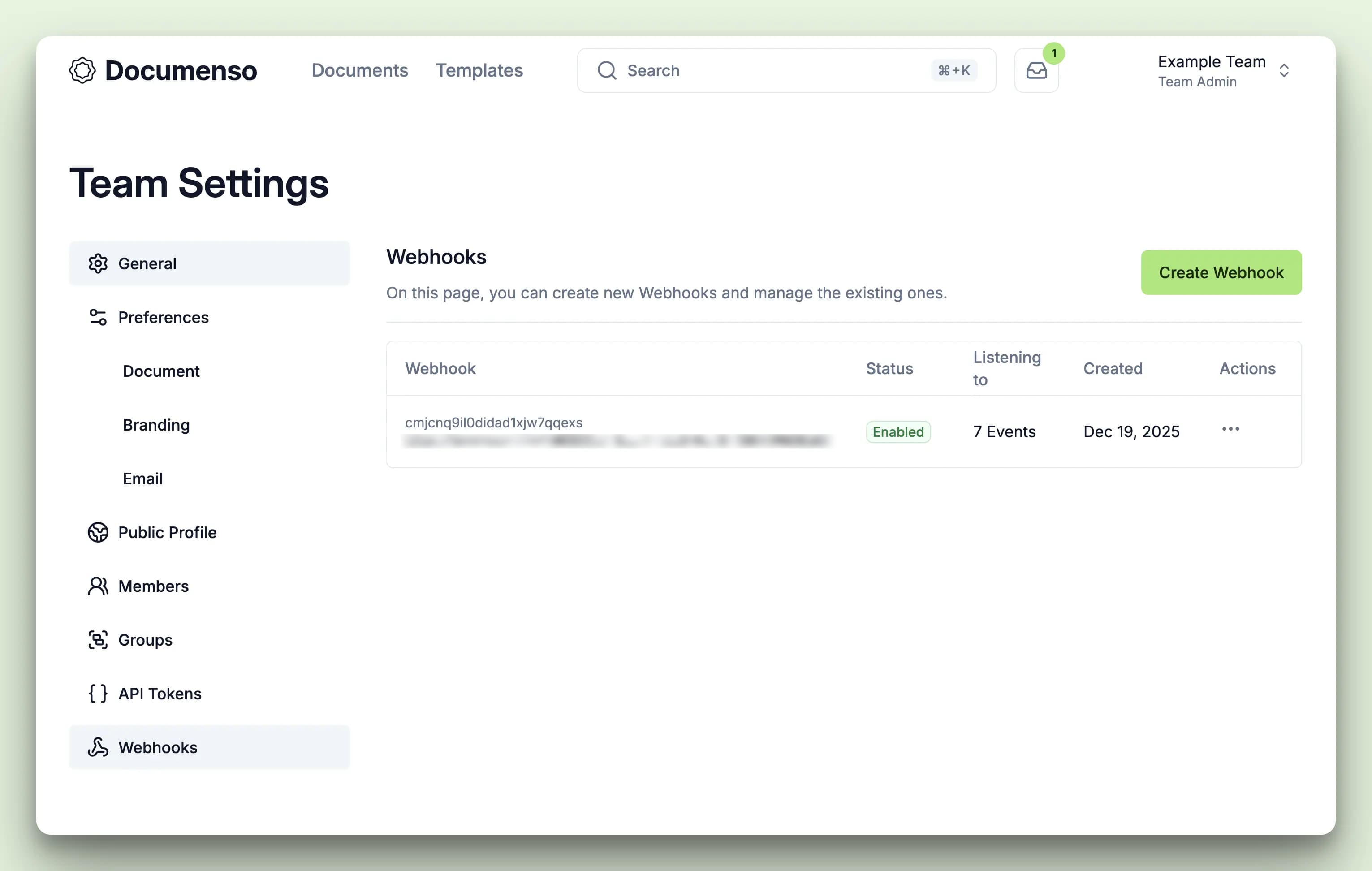
Navigate to team settings
Click your avatar in the top right corner and select Team settings from the dropdown menu.
Configure the webhook
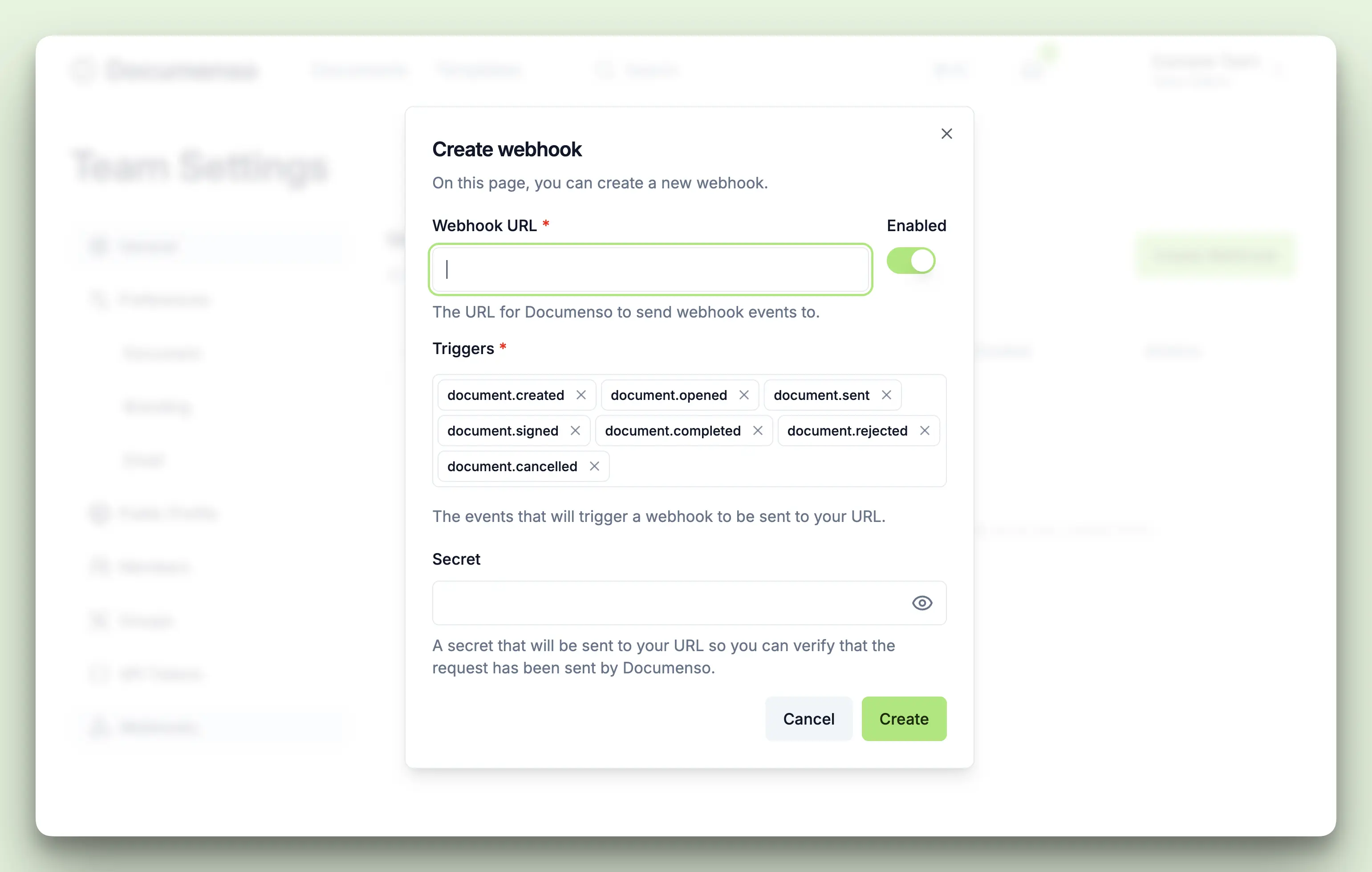
Fill in the following fields:
| Field | Description |
|---|---|
| Webhook URL | The HTTP or HTTPS endpoint that will receive webhook events |
| Events | Select which events should trigger this webhook |
| Secret (optional) | A secret key used to sign the payload for verification |
Save the webhook
Click Create Webhook to save your configuration. The webhook is now active and will receive events.
Webhook URL Requirements
Your webhook endpoint must meet these requirements:
| Requirement | Details |
|---|---|
| Protocol | HTTP and HTTPS are accepted; use HTTPS in production |
| Response | Must return a 2xx status code within 10 seconds |
| Method | Must accept HTTP POST requests |
| Content-Type | Must accept application/json payloads |
| Availability | Must be publicly accessible from the internet |
Documenso performs a best-effort check that rejects webhook URLs which use or resolve to private
or loopback addresses. This is not a complete SSRF mitigation — it does not cover DNS rebinding
and fails open on DNS lookup errors or timeouts — so self-hosted deployments should still enforce
network-level egress rules. Self-hosters that need to deliver to a hostname resolving to a
private address can add that hostname to the comma-separated
NEXT_PRIVATE_WEBHOOK_SSRF_BYPASS_HOSTS environment variable.
For local development, use a tunneling service like ngrok or localtunnel to expose your local server.
Selecting Events
When creating a webhook, you can subscribe to one or more events:
| Event | Trigger |
|---|---|
DOCUMENT_CREATED | A new document is created |
DOCUMENT_SENT | A document is sent to recipients |
DOCUMENT_OPENED | A recipient opens the document for the first time |
DOCUMENT_SIGNED | A recipient signs the document |
DOCUMENT_RECIPIENT_COMPLETED | A recipient completes their required action |
DOCUMENT_COMPLETED | All recipients have completed their actions |
DOCUMENT_REJECTED | A recipient rejects the document |
DOCUMENT_CANCELLED | A pending document is explicitly cancelled or a document owner deletes it |
RECIPIENT_EXPIRED | A recipient's signing deadline passes before they sign or reject |
DOCUMENT_REMINDER_SENT | A reminder email is sent to a recipient |
TEMPLATE_CREATED | A new template is created |
TEMPLATE_UPDATED | A template is modified |
TEMPLATE_DELETED | A template is deleted |
TEMPLATE_USED | A document is created from a template |
You can subscribe to all events or select specific ones based on your needs. For example, if you only need to know when documents are fully signed, subscribe only to DOCUMENT_COMPLETED.
See Webhook Events for detailed payload information for each event type.
Testing Webhooks
Documenso provides a built-in testing feature to verify your webhook endpoint works correctly.
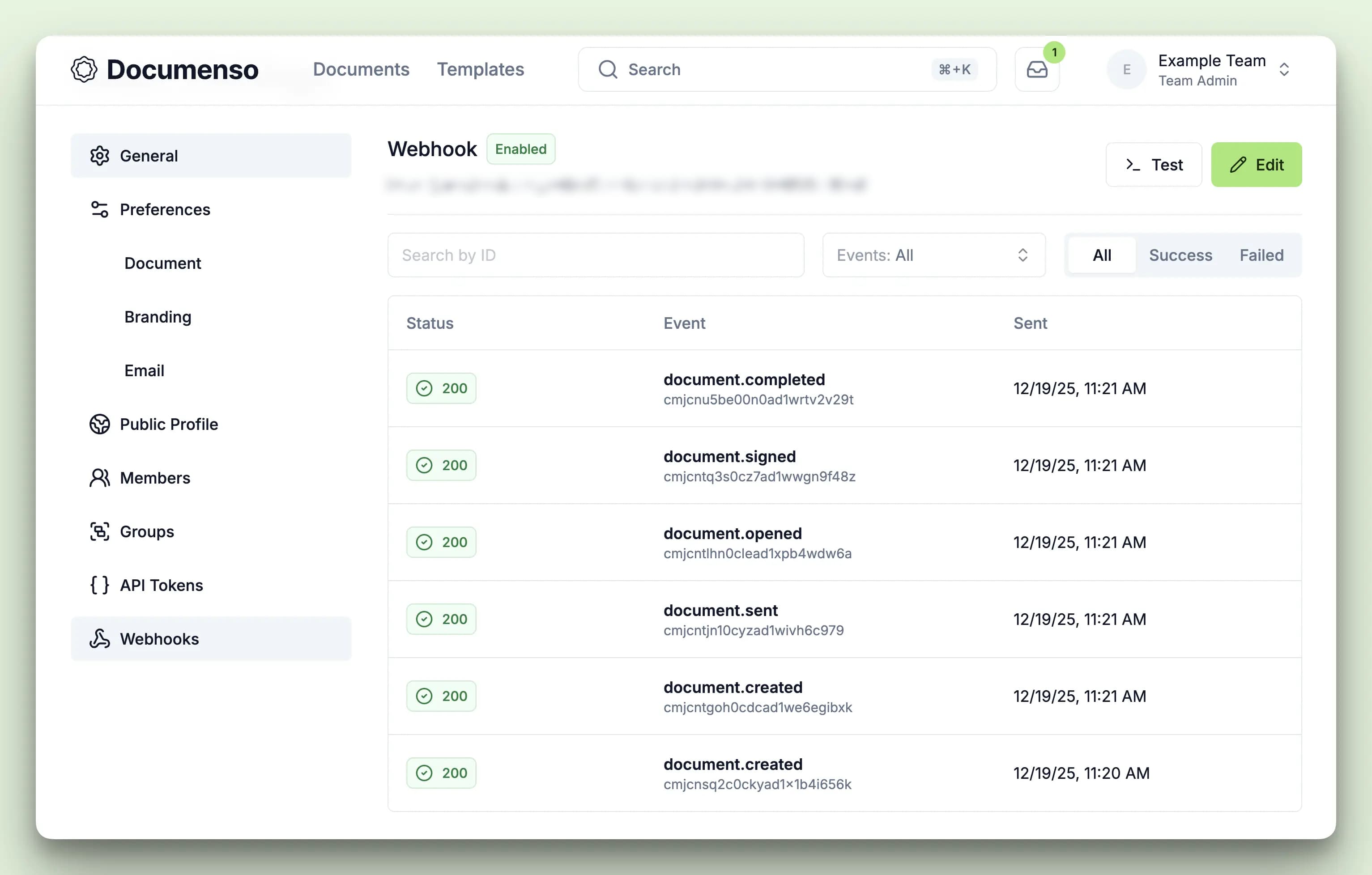
Navigate to webhook details
Go to Team Settings > Webhooks and click on the webhook you want to test.
Click test
Click the Test button in the webhook details page.
Select an event type
Choose which event type you want to simulate from the dropdown.
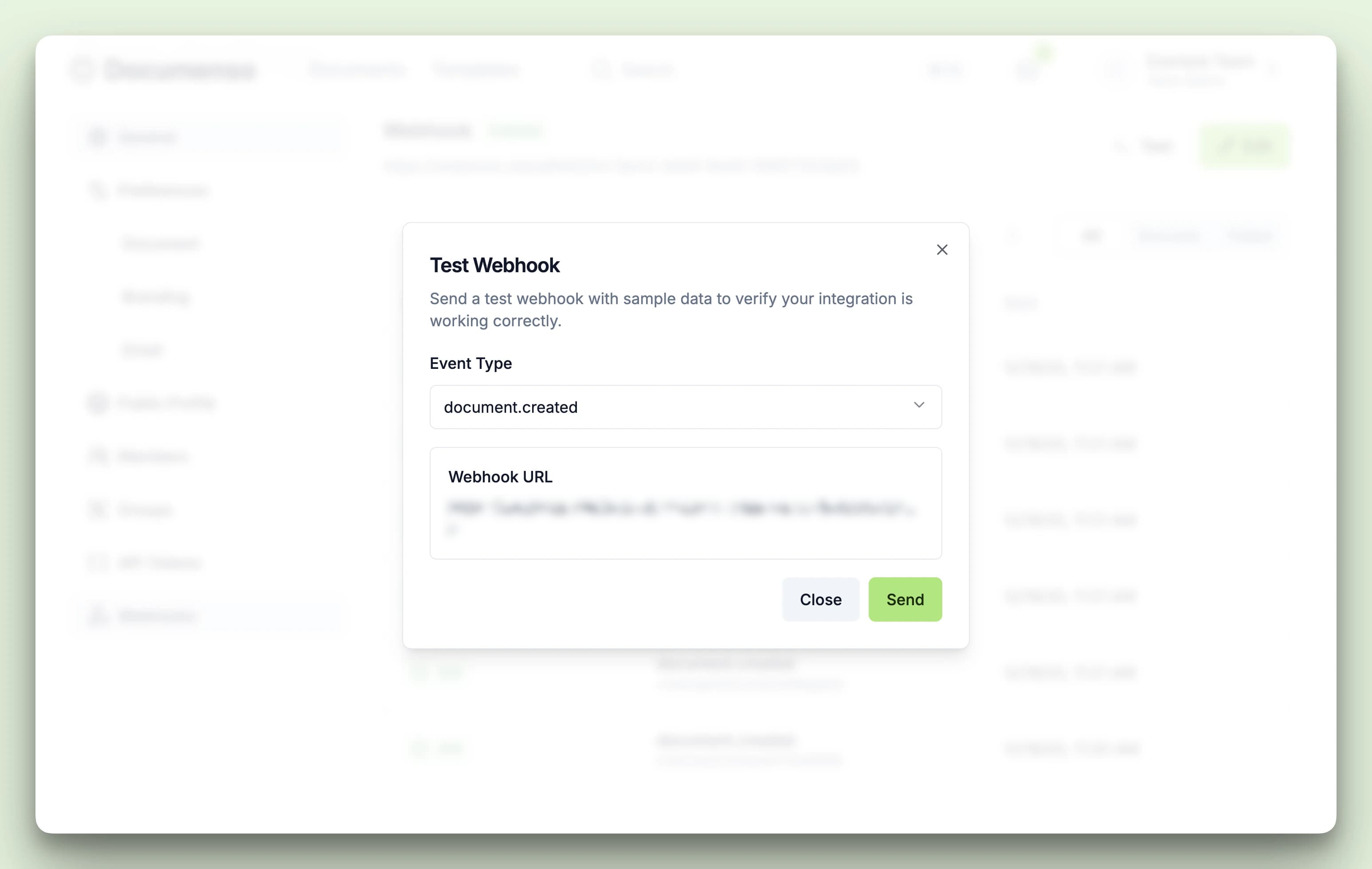
The test payload contains realistic sample data so you can verify your endpoint processes events correctly. After sending, you can view the response in the webhook call logs.
Viewing Webhook Logs
Each webhook subscription maintains a log of all delivery attempts. To view logs:
Go to Team Settings > Webhooks
Click on a webhook to view its details
Review the logs
Each webhook call shows the following details:
- Status (success/failure)
- Event type
- Timestamp
- Response code
- Request and response bodies
- Response headers
Click any call to see full details including headers and response data.
Resending Failed Webhooks
If a webhook delivery fails, you can manually resend it:
Navigate to the webhook call details page
Click the Resend button
Documenso will attempt to deliver the same payload again
Retry Policy
A delivery fails when the endpoint returns a non-2xx response, the 10-second timeout expires, or the request fails. Redirects are not followed, so 3xx responses also fail. Network and SSRF-blocked requests are recorded with response code 0.
For self-hosted deployments, retries are handled by the background-job provider selected with NEXT_PRIVATE_JOBS_PROVIDER:
| Provider | Total attempts | Retry timing |
|---|---|---|
| Local (default) | 4 | Back-to-back, with no backoff |
| BullMQ | 3 | Exponential backoff starting at 1 second |
| Inngest | 5 | Inngest platform backoff |
Only the individual delivery (WebhookCall) record is marked as failed. Documenso does not automatically disable the webhook or apply a circuit breaker, so future matching events continue to be delivered. After automatic attempts are exhausted, you can manually resend a failed delivery from the dashboard.
If your endpoint consistently fails, consider reviewing your server logs and ensuring your endpoint meets all URL requirements.
Security Best Practices
Next Steps
- Webhook Events - Detailed payload structure for each event type
- Webhook Verification - Secure your webhooks with signature verification